

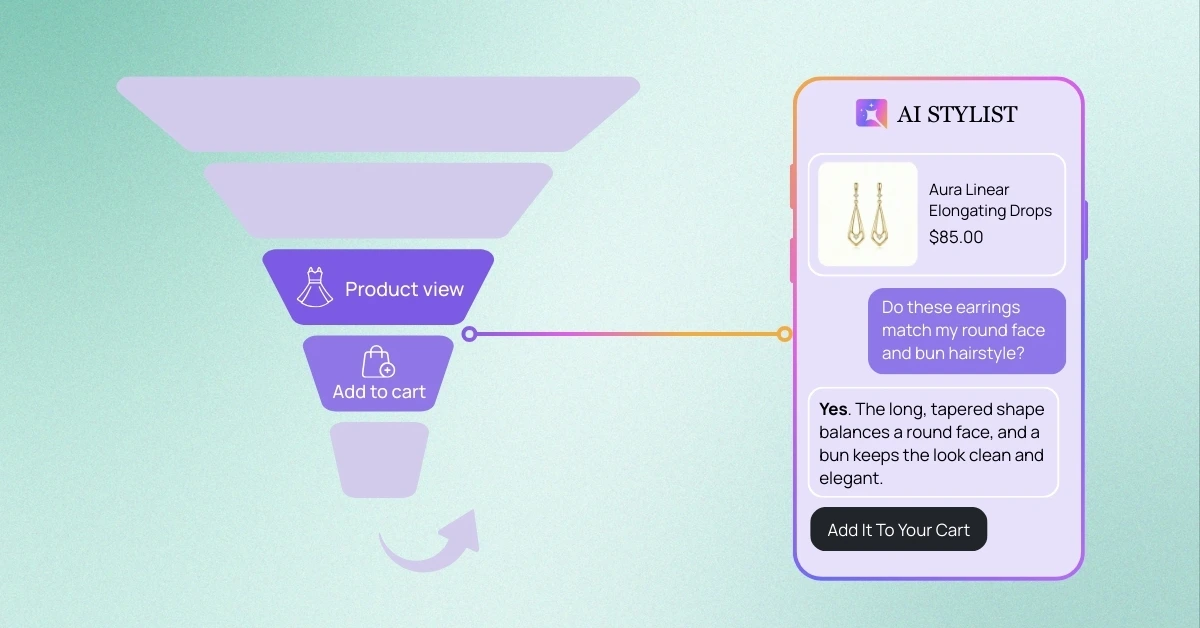
This article is part of our Agentic Fashion Funnel master guide, focused on transforming Shopify fashion stores from passive ‘Silent Catalogs’ into proactive Agentic Stylist experiences that optimize the entire customer journey to boost Conversion Rates, increase Average Order Value (AOV), and drastically reduce Return Rates.
At a Glance:
- The Problem: The “Confidence Gap” on Shopify fashion stores. Shoppers land on Product Detail Pages (PDPs) but hesitate to click “Add to Cart” because of unanswered questions about fit, styling, and material—leading to high view counts but low conversion.
- The Concept:The PDP is often a “Silent Room.” Static images and bullet points cannot provide the emotional validation (e.g., “Does this suit my body?”) or specific modification (e.g., “I wish this had sleeves”) that a human associate provides in a physical store.
- The Solution: Deploying the “Silent Sales Associate.” iWAND’s specialized agents: Consult (Styling/Vibe), Size (Fit), and Refine (Pivot)—engage the customer directly on the page to resolve doubts and close the sale.
Funnel Stage: Product Detail Page (PDP) → Add-to-Cart (ATC) Primary Goal: Overcoming hesitation to boost conversion.
Imagine a customer standing in a fitting room in your physical store. She has the dress on. She turns to the mirror, frowns slightly, and looks for a sales associate. She isn’t asking “How much is this?” She already knows the price. She is asking the questions that actually determine the sale: “Does this color wash me out?” “Is this too bold for a work dinner?” “Will this match my short hair?”
In a physical store, a great sales associate steps in, compliments the fit, and validates her choice. The sale is made. On your Shopify store, this moment happens in silence. The customer looks at the model in the photo. She looks at herself. The doubt creeps in. There is no one to answer the “Vibe Check.” So she closes the tab.
This is the “Gap of Uncertainty.” It is why many Shopify stores have thousands of product views but low Add-to-Cart rates. Here is how iWAND’s Consult Agent breaks that silence and acts as the “Silent Sales Associate” that closes the deal.
Table of Contents
Part 1: The “Vibe Check” (Consult Agent)
The Problem: Static Images vs. Personal Style. Your product photos are beautiful, but standard Shopify product pages are generic. They show the product on a model, not on your customer. Shoppers don’t just buy clothes; they buy a version of themselves. If they can’t visualize how the item fits their specific look (hair, makeup, body shape), they hesitate.
The Solution: Emotional Validation. The Consult Agent is the only tool on the market designed to answer subjective styling questions.
The Scenario: Meet Chloe. Chloe is shopping for statement gold earrings on your site. She has a short pixie cut and usually wears minimal makeup. She loves the earrings, but she freezes.
- The Doubt: “Are these too big? Will they overwhelm my face?”
- The Old Way: She reads the dimensions. “3 inches.” That tells her the size, but it doesn’t tell her the style. She leaves.
- The iWAND Way: Chloe asks the Consult Agent: “I have a short pixie cut. Are these too dramatic for me?”
- The Sales Associate Answer: The Agent replies: “Actually, oversized hoops look stunning with short hair because they frame the jawline without getting tangled in locks. They will add a bold, modern touch to your look without being ‘too much’.”
The Win: The Agent didn’t just give a fact. It gave Style Advice. It validated her insecurity and turned it into a selling point.
Other “Vibe” Questions the Agent Answers:
- “I have cool undertones. Will this beige make me look pale?”
- “Can I wear this slip dress to a conservative wedding if I add a blazer?”
- “Does this print clash with red lipstick?”
Part 2: The “Detail Deep Dive” (Consult Agent)
The Problem: The Functional Barrier. Once the customer loves the look, the logical brain kicks in. They have specific constraints about fabric, care, or utility. Static bullet points rarely answer the specific nuance they care about.
The Scenario: Meet Sarah. Sarah is looking at a linen blazer. She travels for work constantly.
- The Doubt: “I hate ironing. Will this look like a mess after a 3-hour flight?”
- The Interaction: Instead of hunting for the “Fabric Care” tab, she asks the Agent: “Is this travel-friendly? Does it wrinkle easily?”
- The Honest Answer: The Consult Agent replies: “This is a 100% linen blend, so it has natural texture. However, it is designed to look ‘lived-in.’ If you prefer a crisp, wrinkle-free look for meetings, I would recommend our Tri-Blend Blazer instead.”
The Win: The Agent builds trust through honesty. Even if she doesn’t buy the linen blazer, she stays on the site to view the recommendation.
Part 4: The “I Like, But…” Pivot (Refine Agent)
The Problem: The 90% Match. Shoppers often find a product that is almost perfect. They love the pattern or the fabric, but one specific detail kills the deal. In a standard store, this is a dead end. If they don’t like the neckline, they have to hit “Back,” reset the filters, and start searching from scratch. Usually, they just give up.
The Solution: The In-Page Modification. The Refine Agent keeps the user engaged by accepting “Negative Constraints” or “Feature Swaps” instantly. It understands that the user wants to keep the vibe but change a detail.
The Scenario: The Modesty Adjustment A user is viewing a midi dress for a family gathering.
- The Friction: The slit is too high or the sleeves are too short.
- The Interaction: She says: “I love this style, but I want to be more modest.”
- The Agentic Action: The Agent translates “Modest” into specific design attributes (longer hemlines, higher necklines, sleeves).
- The Pivot: “I understand. Here is a similar silhouette that offers more coverage. It keeps the cinched waist you liked but comes with long sleeves and a closed neckline.”
The Win: You turn a specific objection into a customized recommendation, saving a sale that would have been lost to a static filter.
Part 5: Merchant Diagnostics (Is Your PDP Silent?)
How do you know if the “Confidence Gap” is leaking revenue? Check these signs in your Shopify analytics dashboard.
- High Views, Low ATC: If a product has 1,000 views but only a 0.5% Add-to-Cart rate, the product is attractive, but the page is failing to close the deal.
- Tab Switching: Using tools like Microsoft Clarity, look for users who open a new tab immediately after landing on your page. They are likely Googling “How to style X” or “Reviews for X.”
- Hovering on Size Charts: If you see heatmaps showing intense hovering over the size chart but no click on the buy button, your sizing info is confusing them.
Conclusion: Unmute Your Store
The Product Detail Page is the most expensive real estate on your website. It is where you spend all your ad money to get them. Leaving it unattended is like building a luxury showroom and hiring no staff.
Hesitation kills conversion. The difference between a “Window Shopper” and a “Buyer” is often just one answered question.
- “Yes, it suits your hair.”
- “Yes, it fits your body.”
- “Yes, it works for your trip.”
iWAND acts as that voice. It unmutes your store, answers the hesitation, and gives your customers the confidence to click “Add to Cart.”
Give Every Product Page a Proactive Sales Associate with iWAND
Agentic AI stylist for Shopify fashion stores that turns browsers into loyal buyers.
Free, no code, no setup stress
Why do I have high product views but low Add-to-Cart rates on my Shopify?
This is often due to the “Confidence Gap.” Customers are interested in the product (hence the view) but lack the assurance to buy. Unanswered questions about how the item fits their specific body type, how to style it, or care instructions create friction that static descriptions cannot resolve.
How does the Consult Agent differ from a standard chatbot?
Standard chatbots are usually customer support tools (tracking orders, return policies). The Consult Agent is a Sales & Styling tool. It is trained to answer subjective questions like “Will this match my short hair?” or “Is this dress appropriate for a garden party?”, acting like a human stylist rather than a support ticket system.
What happens if a customer likes the style but dislikes a specific detail?
In a standard store, they bounce. With iWAND, the Refine Agent saves the sale. If a user says, “I like this but I want sleeves,” the agent understands the negative constraint and instantly pivots the conversation to recommend a similar item that matches that specific preference.
Does iWAND slow down my Shopify store theme?
No. iWAND is designed as a lightweight, embedded Shopify App that loads asynchronously. It works alongside your existing theme to provide agentic features without impacting your page load speeds or Core Web Vitals.