

At a glance
Add one occasion line to the start of each Shopify product description, saying when and where the piece is worn. Have Sidekick or Claude draft lines for your newest 20 products, approve them in a table, then repeat weekly with Shopify Flow. AI assistants can then match your clothes to “what to wear to…” questions and send more visits.
Time: about 2 hours
Cost: free
Developer: not needed
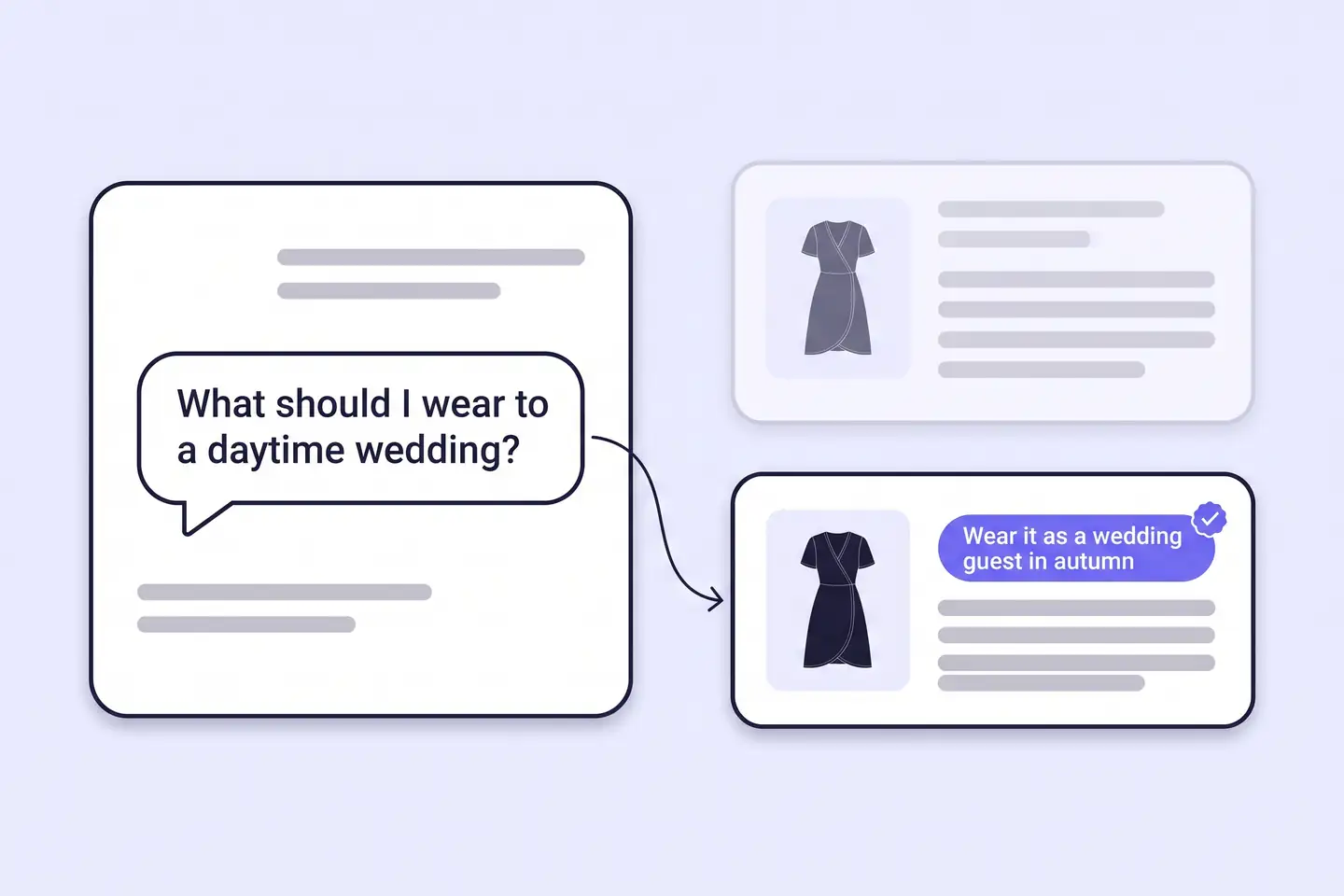
A shopper asks an AI assistant, “What should I wear to a daytime wedding in October?” If your dress description lists only fabric and sizes, the assistant has no wedding to match.
An occasion line is one sentence at the start of a product description. It says when, where and how dressed-up a shopper would wear the piece. This guide is about being found by AI, which grows AI Traffic: visits from AI assistants and search. More visits mean more shoppers arriving ready to buy.
This guide is about getting found. To remove the last doubt once shoppers land, read How to Add Styling Tips to Product Pages to Raise Conversion.
Part of Grow Your Shopify Fashion Store with Styling: Salesperson to Stylist, our guide to turning a Shopify fashion store from a salesperson into a stylist.
In this guide
A salesperson
describes the fabric and the fit.
A stylist
tells the shopper where to wear it.
Why do occasion words help AI assistants recommend your clothes?
Occasion words help because shoppers ask AI assistants for clothes by moment, not by product type.
Shopify tells merchants that AI platforms consider each product’s name, description, images, type, vendor, collections and tags. Shopify says accurate, detailed descriptions can increase the chance that a product appears in results (Shopify Help Center, 2026). Each platform also weighs its own factors, so no description guarantees a recommendation.
393%
AI-referred visits to US retail sites grew 393% year over year in Q1 2026, and in March 2026 they converted 42% better than non-AI traffic.
Source: Adobe, 2026, U.S. retailers see surge in AI traffic
66%
Adobe’s checker scores individual retail product pages 66% on average for machine readability, so about a third of their content is invisible to LLMs.
Source: Adobe, 2026, many retail websites are not entirely readable by machines
Shopify’s president said on the Q2 2026 earnings call that AI-driven traffic and orders to Shopify stores tripled year over year. Retail TouchPoints reported that half of AI-referred sessions land directly on product pages (Retail TouchPoints, 2026). A description that names the occasion gives an assistant the match for that landing page.
What does a good occasion line look like?
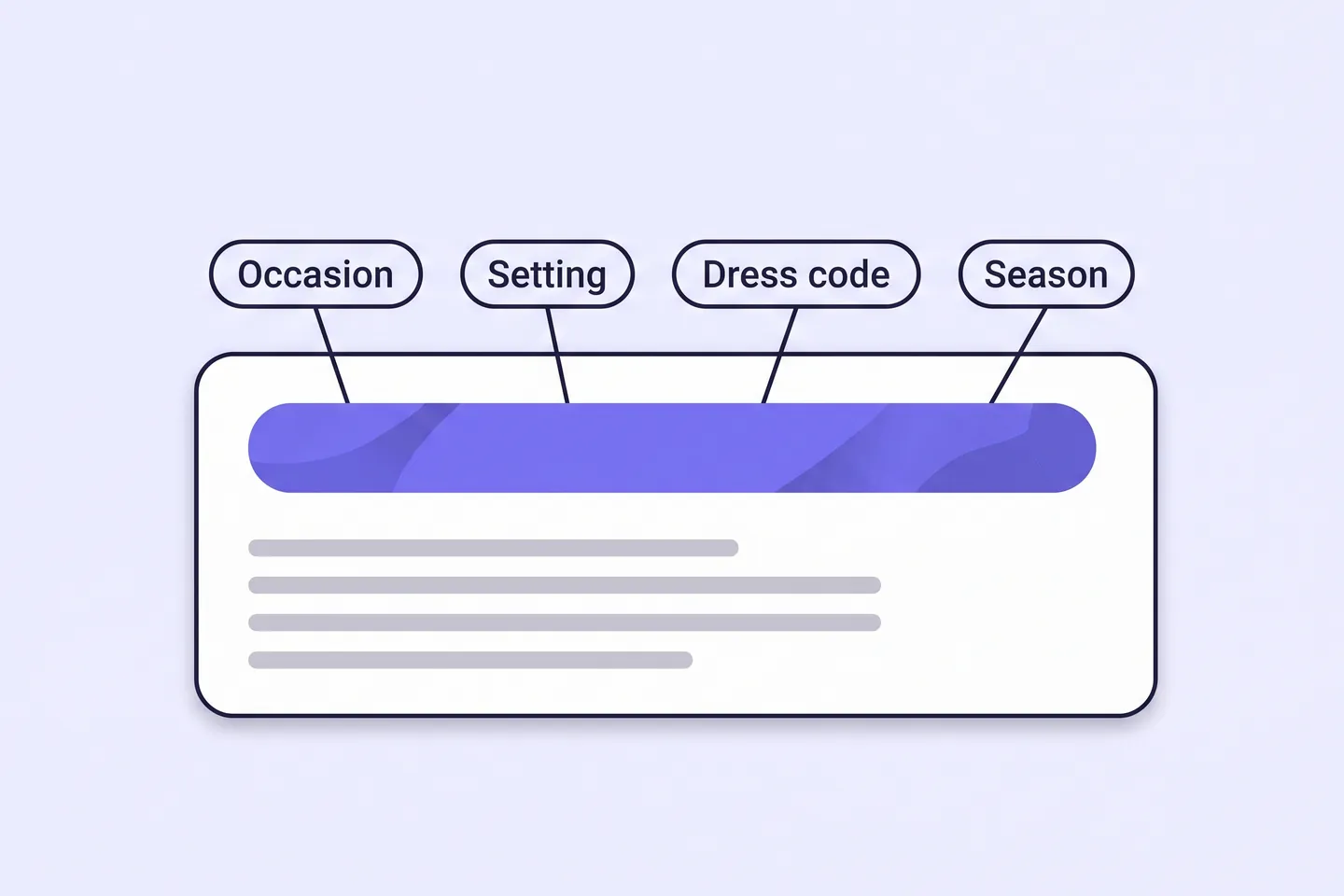
A good occasion line names the setting, the dress-code level and, when relevant, the season.
It stays under 30 words, comes first in the description and uses only facts already true of the piece. Use one fixed list of occasions across the catalogue: wedding guest, workwear, holiday, party, date night and everyday.
This illustrative before and after uses an imagined dress, not a real store:
| Version | Description |
|---|---|
| Before | Midi wrap dress in crepe. Adjustable tie waist. Available in sage and navy. |
| After | Wear this midi wrap dress as a wedding guest in spring or autumn, to a garden party, or to a smart dinner. Dressy enough for a ceremony, easy to dance in. Crepe, with an adjustable tie waist, in sage or navy. |
If you also add Shop by Occasion, use the same list so your tags and descriptions agree.
Not worth it if
Stores with under 20 products, or one occasion such as bridal, can write the lines by hand. They can skip the agent and the Flow.
How do I check my store in two minutes?
Open five best sellers on your phone and check whether the first screen of each description says when and where to wear the piece.
- Open five best sellers. On your phone, open five best-selling product pages on your live store.
- Read the first screen. Ask one question: does the description say when and where to wear the piece?
- Ask an AI assistant. Type “What should I wear to [an occasion you sell for]?” and note whether your brand appears. Treat that as a signal, not a score.
Check this on your store with the free Styling Score
Bots walk your store like a shopper. You get a score out of 100, a tier and a report.
How do I add occasion lines with an AI agent?
An AI agent can draft occasion lines for 20 products in minutes, and you approve every line before it is written.
Use Shopify Sidekick inside your admin, the Shopify connector for Claude, or the Shopify plugin for ChatGPT. All three follow the same five steps.
Back up before you change anything
Export a CSV first: Products › Export, then choose all products. Run the first batch on 3 products, check them, then do 20.
- ReadThe 20 newest products in one collection
- ProposeA table of lines, nothing written
- ApproveYou edit the table and reply apply
- WriteOnly the approved rows
- VerifyOpen five products on a phone
Copy the prompt that matches your tool.
Products: [the 20 newest products in the collection Dresses]

For each product, write one occasion line of 15 to 30 words to go at the start of its description.
Name 1 to 3 occasions from this list only: wedding guest, workwear, holiday, party, date night, everyday.
Add the dress-code level (casual, smart casual or formal) and the season when the product supports it.
Use only facts already on the product: title, description, fabric, colour, fit. Do not invent details.
Write in my brand voice. Two examples of my own sentences:
- "[YOUR EXAMPLE 1]"
- "[YOUR EXAMPLE 2]"

Change only the description. Never touch prices, inventory or discounts.
When I reply "apply", add each approved line as the first sentence of that product's description,
and remove the tag needs-occasion-line from those products if they have it.

Show me a table first: product, current first sentence, proposed occasion line, one-line reason.
Do not change anything until I reply "apply".
Export a CSV backup first. The prompt changes nothing until you reply apply.
Using the Shopify connector, read [the 20 newest products in the collection Dresses] in my Shopify store.

For each product, write one occasion line of 15 to 30 words to go at the start of its description.
Name 1 to 3 occasions from this list only: wedding guest, workwear, holiday, party, date night, everyday.
Add the dress-code level (casual, smart casual or formal) and the season when the product supports it.
Use only facts already on the product: title, description, fabric, colour, fit. Do not invent details.
Write in my brand voice. Two examples of my own sentences:
- "[YOUR EXAMPLE 1]"
- "[YOUR EXAMPLE 2]"

Change only the description. Never touch prices, inventory or discounts.
When I reply "apply", update the approved products one at a time. Add each approved line as the first sentence of the description,
and remove the tag needs-occasion-line from the product if it has it. Tell me which products are done.

Show me a table first: product, current first sentence, proposed occasion line, one-line reason.
Do not change anything until I reply "apply".
Mention Shopify by name so the assistant uses the connector. Export a CSV backup first.
- Run it on 3 products first. Open Sidekick from any page in your Shopify admin, paste the prompt and read the table.
- Edit the table, then reply apply. Change any line you would not say yourself. Sidekick presents changes for review before applying them, but read every row.
- Open five products on your phone. Check that each description opens with its occasion line, then run the next batch.
Start with your best sellers
Swap the product line of the prompt for your 20 best sellers. They carry the most traffic.
A connected AI tool changes items one at a time, so a large batch can stop partway. Keep batches to 20 and finish any leftovers in the admin (Shopify Help Center, 2026). Data you share with Claude or ChatGPT is handled under that provider’s terms.
How do I add occasion lines by hand, if I prefer?
By hand, an occasion line takes about 4 minutes per product: write one sentence, save and check it on your phone.
- Open the product. In your Shopify admin, go to
Productsand open a product. - Add the occasion line. Click in the description and type the line as its first sentence.
- Save and check. Click Save, then open the page on your phone.
For many products, export your CSV, edit the description column in a spreadsheet and import the file back. Do not sort the file. Shopify warns that sorting can disconnect variants and image URLs. Importing a sorted file might overwrite products with bad data (Shopify Help Center, 2026).
How do I keep occasion lines up to date as new products arrive?
Shopify Flow can tag every new product, and a weekly run turns each tag into an occasion line.
Shopify Flow is a free app on the Basic, Grow, Advanced and Plus plans (Shopify Help Center, 2026).
- Tag new products. Open
Apps › Flowand start a new workflow. Choose the trigger Product created and the action Add product tags, enterneeds-occasion-line, then turn the workflow on. Tags are case sensitive. - Or ask Sidekick to build it. On a desktop, open Sidekick in Flow and paste the prompt below. Sidekick-generated workflows are inactive by default, so turn yours on and test it with a new product.
Create a workflow that starts when a product is created and adds the product tag needs-occasion-line.Sidekick builds the workflow for you to review. It stays inactive until you turn it on.
- Run it weekly. Save the Sidekick prompt above as a skill:
Sidekick › plus icon › Skills › New Skill. Once a week, run it with “/” and the skill’s shortcut, and change the product line to “Products: up to 20 products tagged needs-occasion-line”.
Review each weekly batch the same way. The prompt removes the tag from each product you approve.
Which apps can help?
Start with the tools built into Shopify. Add a spreadsheet app only for hundreds of descriptions.
| App | What it does | Price | Checked | Best for |
|---|---|---|---|---|
| Shopify Sidekick | Drafts and edits descriptions; builds Flow workflows from a description | Built into the Shopify admin | Oct 15, 2026 | Keeping everything in one place |
| Shopify connector for Claude | Reads and updates products from Claude within the access you approve | Claude plan terms apply | Oct 15, 2026 | Founders who already work in Claude |
| Shopify Flow | Tags new products so none are missed | Free on Basic, Grow, Advanced and Plus | Oct 15, 2026 | Keeping lines current |
| Matrixify | Bulk updates through Excel, CSV or Google Sheets | Free for up to 10 products per file; Basic $20/month | Oct 15, 2026 | Large catalogues edited in a spreadsheet |
| Setary | Spreadsheet-style bulk editor with preview and undo | $9.99/month, 7-day free trial | Oct 15, 2026 | Editing many descriptions without CSV files |
What happens after AI sends the shopper?
After AI sends the shopper, she lands on a product page, so the next job is keeping her exploring and removing her last doubt.
Keep her browsing with How to Add Shop by Occasion to Your Shopify Store, part of Engagement. Remove the last doubt with How to Add Styling Tips to Product Pages to Raise Conversion, part of Conversion Rate.
How long does it take and what does it cost?
Writing occasion lines for your first 60 products takes about 2 hours with an AI agent, and Sidekick makes it free.
These times are estimates for a first batch, not measured results.
| Route | Time | Cost | Skills needed |
|---|---|---|---|
| By hand | About 4 minutes per product; about 4 hours for 60 | Free | Editing in the Shopify admin |
| With an AI agent | About 2 hours for 60 products, including the Flow and your review | Free with Sidekick; your own plan if you use Claude or ChatGPT | Reading a table, approving rows |
| With an app | About 2 hours for 60 products, plus writing the lines | $9.99 to $20 a month | Working in a spreadsheet |
How do I know it’s fixed?
The fix is working when your best sellers open with an occasion line and AI-referred orders rise over several weeks.
Run the free Styling Score again once your best sellers carry occasion lines, and check the AIT-01 card for this factor.
Check this on your store with the free Styling Score
Bots walk your store like a shopper. You get a score out of 100, a tier and a report.
Then watch AI-referred orders. Orders from AI channels display in your Shopify admin with channel or referrer attribution (Shopify Help Center, 2026). Compare the 30 days before and after your update.
Expect an undercount. After an AI assistant surfaces a product link, 43% of shoppers open a new tab and search for it. The visit then looks direct (Adobe via Marketing Week, 2026).
Where does this fit in AI Traffic?
AI Traffic has five factors, and this guide covers the first.
- AIT-01Product descriptions name the occasionOccasion lines that match “what to wear to…” questions.You are here
- AIT-02Product names say what the item isTitles that name the piece, so AI and Google can find it.
- AIT-03Collection pages explain the need they serveCollection descriptions written around the shopper’s need.
- AIT-04Styling guides on the siteGuides that AI assistants can cite when people ask what to wear.
- AIT-05The brand’s style in plain wordsA plain description of your style for AI to repeat.
Part of Grow Your Shopify Fashion Store with Styling: Salesperson to Stylist, our guide to turning a Shopify fashion store from a salesperson into a stylist.
What else do founders ask about occasion lines?
Founders most often ask these six questions.
What should an occasion line say?
An occasion line names one to three occasions, the setting, the dress-code level and, where it fits, the season. For example: a spring wedding guest, a garden party, formal. Use only facts already true of the piece, such as fabric, colour and fit. The line then stays accurate for shoppers and AI assistants.
How long should a fashion product description be?
The occasion line is one sentence of 15 to 30 words, and the rest of the description can keep its current length. Put fabric, fit, care and sizes below it. Shopify advises detailed, accurate descriptions for AI platforms, so add real facts rather than filler, and avoid repeating one sentence across products.
Do I need an app to do this?
No. Shopify Sidekick, the product page and Shopify Flow are built into your admin or free, and they cover the whole job. Flow needs a Basic plan or higher. Add a spreadsheet app such as Matrixify only if you want to update hundreds of descriptions from one file.
How many occasions should I name per product?
Name one to three occasions per product, chosen from one fixed list. Naming too many makes a piece sound like it suits nothing in particular. A fixed list also keeps your descriptions consistent with any occasion tags or collections you add later, such as Shop by Occasion.
How long until AI assistants recommend my clothes?
Nobody can promise a date or a recommendation. Shopify says each AI platform also weighs its own factors beyond your product data. Compare AI-referred orders for the 30 days before and after your best sellers are updated, and judge the trend over several weeks.
How do I stop AI-written descriptions sounding generic?
Give the agent two sentences you wrote yourself and limit it to facts already on the product. Read every row in the table before you reply “apply”. Rewrite any line that could describe any dress. A specific setting, such as a garden party, sounds more human than a word like “versatile”.
Sources
- Shopify Help Center. Optimizing your products for AI platforms. Checked Oct 15, 2026. https://help.shopify.com/en/manual/shopify-catalog/optimizing-products
- Shopify Help Center. Shopify agentic storefronts. Checked Oct 15, 2026. https://help.shopify.com/en/manual/online-sales-channels/agentic-storefronts
- Shopify Help Center. Sidekick. Checked Oct 15, 2026. https://help.shopify.com/en/manual/ai-powered-tools/sidekick
- Shopify Help Center. Using skills with Sidekick. Checked Oct 15, 2026. https://help.shopify.com/en/manual/ai-powered-tools/sidekick/skills
- Shopify Help Center. Shopify connector for Claude. Checked Oct 15, 2026. https://help.shopify.com/en/manual/ai-powered-tools/connecting-ai-tools/shopify-connector-for-claude
- Shopify Help Center. Shopify Flow. Checked Oct 15, 2026. https://help.shopify.com/en/manual/shopify-flow
- Shopify Help Center. Creating workflows manually or from a template. Checked Oct 15, 2026. https://help.shopify.com/en/manual/shopify-flow/create/create-workflow
- Shopify Help Center. Flow triggers. Checked Oct 15, 2026. https://help.shopify.com/en/manual/shopify-flow/reference/triggers
- Shopify Help Center. Add product tags (Flow action). Checked Oct 15, 2026. https://help.shopify.com/en/manual/shopify-flow/reference/actions/add-product-tags
- Shopify Help Center. Exporting products. Checked Oct 15, 2026. https://help.shopify.com/en/manual/products/import-export/export-products
- Adobe for Business Blog. Adobe report: U.S. retailers see surge in AI traffic, but many websites are not entirely readable by machines. April 16, 2026. https://business.adobe.com/blog/ai-traffic-surge-retail-sites-not-machine-readable
- Marketing Week (Adobe Digital Insights, partnership content). AI traffic is surging, but many retail sites aren’t readable. April 21, 2026. https://www.marketingweek.com/ai-traffic-is-surging-but-many-retail-sites-arent-readable/
- Retail TouchPoints. Shopify Credits AI for 34% Revenue Growth in Q2 2026. August 5, 2026. https://www.retailtouchpoints.com/news/shopify-credits-ai-for-34-revenue-growth-in-q2-2026/620805/
- Shopify App Store. Listings for Shopify Flow · Matrixify · Setary. Checked Oct 15, 2026.
AI Traffic
Check every AI Traffic factor on your store
The free Styling Score walks all five AI Traffic factors and shows where your store stands.
Master pillar
From a salesperson into a stylist
Part of Grow Your Shopify Fashion Store with Styling: Salesperson to Stylist, our guide to turning a Shopify fashion store from a salesperson into a stylist.