

At a glance
A product name AI can match is your style name, one or two details a shopper searches for, and the item word: Maya Linen Midi Dress, not Maya. Install the free Product Names Styling Skill in Sidekick or Claude, test it on 5 products, then rename the rest in batches of 20. A Shopify Flow tag keeps new products named.
Time: about 1 hour
Cost: free with Sidekick or your Claude plan
Developer: not needed
App: not needed
Check my store’s product names · Fix them now with the free Skill
Part of Grow Your Shopify Fashion Store with Styling: Salesperson to Stylist, our guide to turning a Shopify fashion store from a salesperson into a stylist.
In this guide
What is a shopper actually asking for?
She asks for the piece in her own words, and AI can only show her pieces whose product data uses those words.
It is late, she is on the sofa, and she types into an AI assistant: “Can you find me a green linen midi wrap dress with sleeves, under $150?” The assistant can match that request only to pieces whose product data says linen, midi and wrap dress. A dress named only Maya matches none of her words.
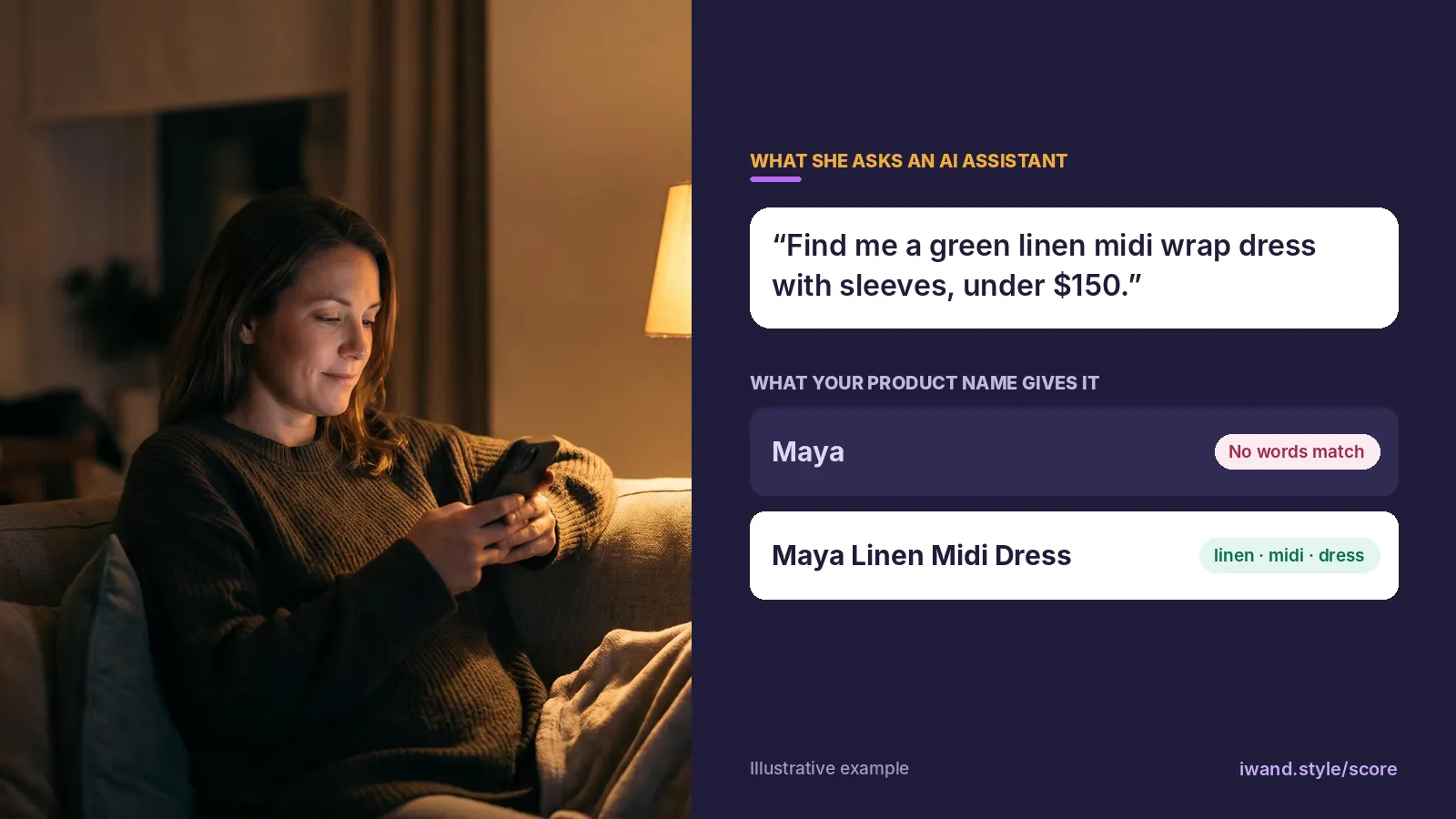
Shopify describes the same moment: a shopper asks an AI channel for something like navy running shorts, and it returns the products it thinks fit (Shopify Help Center, 2026). This guide is about being found, which grows AI Traffic: visits from AI assistants and search.
A salesperson
says “This is Maya.”
A stylist
says “This is Maya, our linen midi dress.”
Why do product names decide whether AI finds your pieces?
AI assistants pick products by matching the shopper’s words to product data, and the name is the first thing they read.
Shopify tells merchants that AI platforms consider each product’s name, description, type, images and tags (Shopify Help Center, 2026). A name that says what the item is puts the piece into more AI answers. A name that is only a style word gives the assistant nothing to match, however good the description below it.
66%
On US retail sites, product pages were the hardest page type for AI to read: 66% on Adobe’s AI visibility check, against 75% for homepages.
393%
AI traffic to US retail sites grew 393% year over year from January to March 2026.
More shoppers are asking, and product pages are where AI struggles most. A clear name is the cheapest fix on that page.
How many Shopify fashion stores name their products well?
Of 142 Shopify fashion stores the Styling Score reviewed from Oct 12 to Nov 6, 2026, 131 have product names that say what each item is, but only 81 name every sampled piece with its item word and a detail.
81 of 142
stores the Styling Score reviewed name every sampled piece with its item word and a detail. Most stores clear the bar, but 61 still have at least one sampled name that lacks its item word or a detail.
Source: iWAND Styling Score reviews of 142 Shopify fashion stores, Oct 12 to Nov 6, 2026
| Result | What it means | Stores | Share of 142 |
|---|---|---|---|
| Done | 5 or more of 10 names have the item word and a detail | 131 | 92% |
| Halfway | 3 or more names have the item word, but too few add a detail | 8 | 6% |
| Not yet | 0 to 2 names have the item word | 3 | 2% |
What Halfway looks like. Every or nearly every name has an item word, but only 2 to 4 of 10 add a detail: names like a bare Top, Tee or Baselayer Pant. The 3 Not yet stores use person or line names with almost no item words.
The mistakes we saw most across the 142 stores:
- An item word with no colour, fabric, cut or length.
- Person or style names standing alone, with no item word.
- The item word left out on jeans and bags.
How we checkedWe took every store in the Styling Score hub scored from Oct 12 to Nov 6, 2026: 151 stores. We left out 8 the Score couldn’t read (blocked, password-protected or not on Shopify) and 1 whose Product Names result was not checked, which leaves 142. For each store the Score reads 10 sampled names, the first 2 in-stock fashion products of its 5 largest product types, and judges each for an item word and a detail. We read the results on Nov 7, 2026 and checked some by hand. We name no store’s result.
What does a good fashion product name look like?
A good name keeps everything that makes it yours and adds only the words a shopper would type: your style name, one or two details, then the item word.
- Style nameAs you write it, in front: Maya
- 1 or 2 detailsFrom the product’s own data: Linen Midi
- Item wordThe word she types: Dress
- Colour, lastOnly when each colour is its own product: – Sage
Six rules keep every name consistent:
- Use the item word. Every name has the word a shopper would type: midi dress, wrap skirt, crossbody bag, hoop earrings, Chelsea boots, kurta set.
- Add one detail, two at most. Take it only from the product’s own data, in the order shown for its category below.
- Keep your brand. Keep the style name spelled as you write it and placed first, your own colour names, your casing and separators, and your market’s words: trousers in the UK, pants in the US, and kurta, abaya or saree as they are.
- Handle colour simply. Leave it out when the piece sells several colours as options. When each colour is its own product, add it last, in your own colour word.
- Add nothing else. No keyword lists, repeated words, filler words (luxury, trendy, chic, designer), sale or stock words, prices, codes, emoji, the occasion, or a gender word in a store that sells to one gender.
- Keep it short. Most names under 50 characters, with the item word always inside the first 70. Leave out measurements such as a heel height in millimetres. Google says shoppers usually notice only the first 70 characters or fewer (Google Merchant Center Help, 2026).
Which detail goes first in each category?
Pick in this order and stop at two. The words follow Shopify’s Standard Product Taxonomy where it has them, so your names match your category fields. If you sell other brands, put the label’s name first.
| Category | Item word | First detail | Second detail |
|---|---|---|---|
| Dresses, skirts | dress, skirt, slip dress, wrap skirt | Length | Fabric or print |
| Tops, knitwear | blouse, tee, shirt, cardigan, jumper | Neckline, sleeve or fit | Fabric |
| Trousers, jeans | trousers or pants, jeans | Leg or fit | Rise or fabric |
| Outerwear | trench, puffer, blazer, coat | Fabric | Length or a feature |
| Sets | co-ord set, two-piece set | Fabric or print | What’s in the set |
| Swim, lingerie | bikini top, one-piece, bra | Style, such as triangle or plunge | Fabric or print |
| Shoes | boots, sandals, heels, sneakers | Material | Heel word or style |
| Bags | tote, crossbody bag, shoulder bag | Material | Size |
| Jewellery | hoop earrings, pendant necklace, ring | Exact metal and finish | Stone or design |
| Accessories | scarf, belt, hat type, sunglasses | Material | Shape or style |
What changes, before and after?
Illustrative examples, not real stores:
| Before | After | What changed |
|---|---|---|
| Maya | Maya Linen Midi Dress | Item word and length added; the style name stays |
| The Soho | The Soho Leather Crossbody Bag | Material and bag type added; The kept because it’s the brand’s style |
| Golden Hour | Golden Hour Gold-Plated Hoop Earrings | The exact finish and the design added |
| Weekend Trouser SALE | Weekend Wide-Leg Linen Trouser | Sale word removed; fit and fabric added |
| Dress Women Summer Maxi Boho Dress | Boho Cotton Maxi Dress | Keyword list replaced by one style word, the fabric and the item word |
Not worth it if
Your names already have the item word and a detail on most pieces. Then your time is better spent on occasion words in your descriptions.
Which brands name their products well?
Wrabyn, Silk Laundry and Christopher Esber each say what the piece is in their own way, and AI can read every name.
All three meet the bar in our check, and we read their product lists live on Nov 5, 2026. None of them uses iWAND.
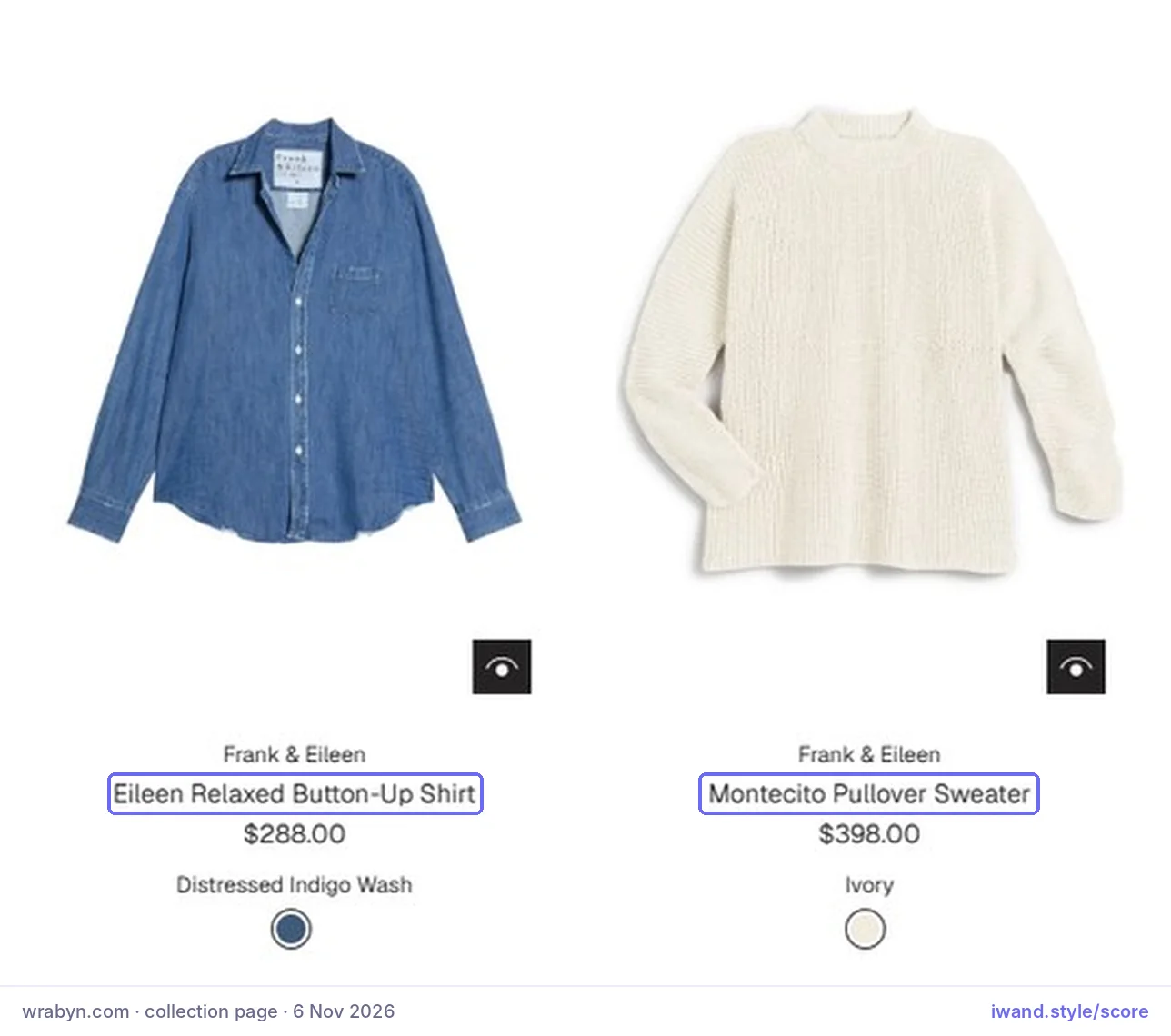
Done · boutique, United States
Each name is a style name, one fit or detail word and the item word, kept short: Eileen Relaxed Button-Up Shirt, Montecito Pullover Sweater, Brennan Barrel Leg Jean. One detail is enough when it is the one shoppers filter by.
One thing to copyGive every pair of trousers or jeans one fit word, such as barrel leg or wide leg.
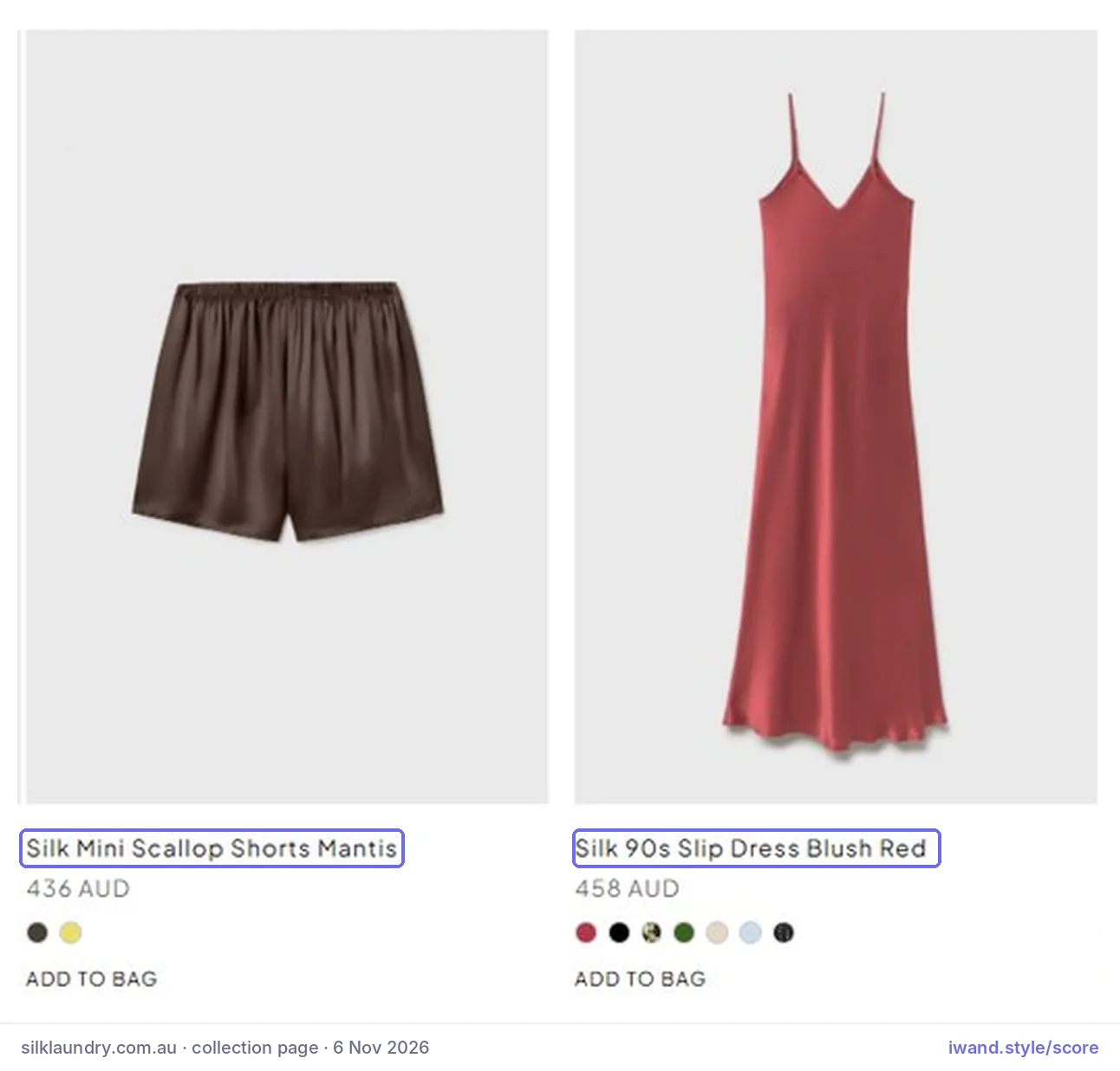
Done · own brand, Australia
No invented names. The fabric comes first, then the cut and the item word: Silk Mini Scallop Shorts Mantis, Silk 90s Slip Dress Blush Red. The fabric is what the brand is known for, so it leads every name.
One thing to copyLead with the fabric when the fabric is the brand.
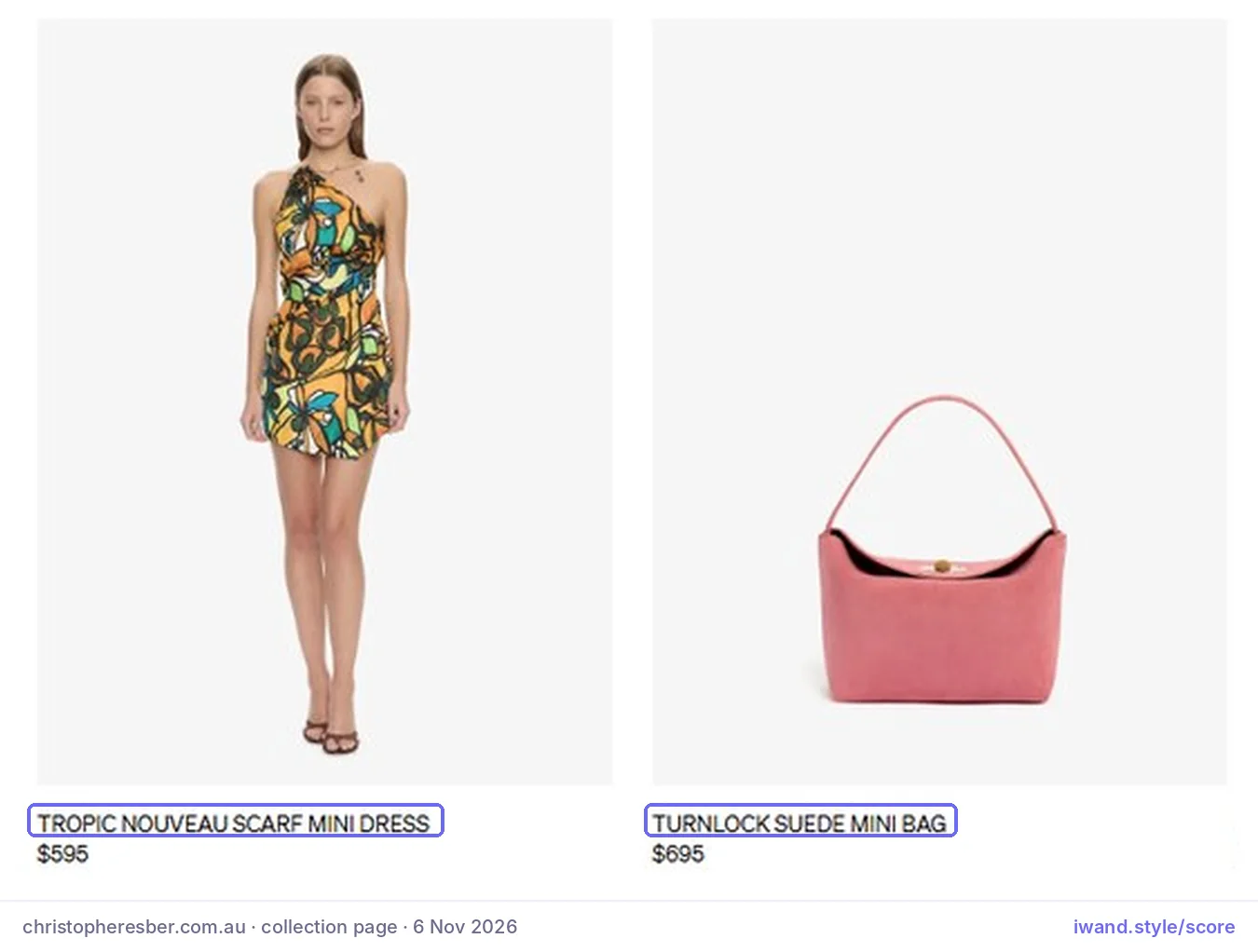
Done · designer label, Australia
The label keeps its line names and adds the material, size or length: Turnlock Suede Mini Bag, Oasis Ruched Midi Skirt. It shows that clear names don’t cheapen a premium brand.
One thing to copyFor bags, give the material and the size before the bag word.
How do I check my product names in two minutes?
Cover the photos on your biggest collection and read 10 names: each should say what the item is and add one detail.
- Open your biggest collection. On your phone, open the collection with the most products. Cover the photos with your thumb and read only the first 10 product names.
- Ask two questions of each name. Does it say what the item is, such as dress, tote or hoop earrings? Does it add one detail a shopper searches by: a colour or print, fabric, length, fit or cut?
- Count the names that pass both. 5 or more of 10 meets the Styling Score’s bar for this factor, and all 10 is the goal.
Check this on your store with the free Styling Score
Bots walk your store like a shopper. You get a score out of 100, a tier and a report.
How do I get the Styling Skill and test it on 5 products?
Download the free Product Names Skill, add it to Sidekick or Claude, and let it propose new names for 5 products before anything changes.
A Styling Skill is a saved set of instructions your AI assistant follows every time. This one renames products with the rules above, changes only the title, and waits for your reply before it writes anything. It is free and open: no email, form or sign-in.
- Free, no email or sign-in
- Changes only the title
- Waits for your reply first
Add it to Sidekick
- Open a new skill. In your Shopify admin, click the Sidekick field, then
plus icon › Skills › New Skill. - Paste the Skill. Use the shortcut
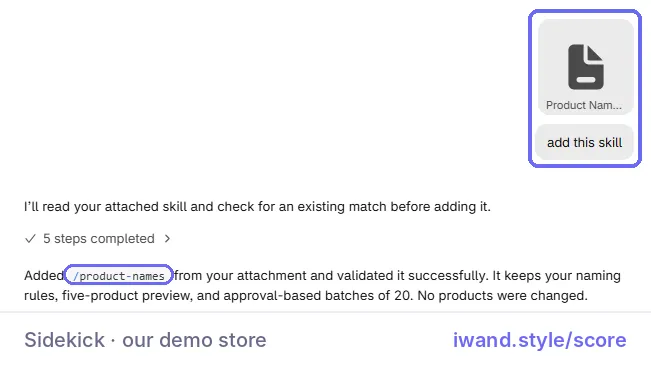
/product-namesand paste the text from the Sidekick download. You can also attach the downloaded file in a Sidekick chat and type add this skill.
Add it to Claude
- Upload the zip. Upload the Claude download in Claude’s Skills settings. It holds one file,
product-names-skill/SKILL.md. - Connect your store. Use the Skill with the Shopify connector for Claude, and mention Shopify by name in your request so Claude uses the connector.
Run the test on 5 products
On the first run, the Skill asks you five things and uses your answers every time: whether to keep your style names in front, where colour goes, whether to keep your casing, any words to always or never use (trousers, not pants), and three to five current names you like. Then it picks 5 products of different types and shows a table. Nothing changes until you reply apply.
This is the test it ran on our demo store, Muse & Method, a fictional brand, on Nov 6, 2026:
| Current name | Proposed name | Reason |
|---|---|---|
| Tova – Black | Tova Croc-Embossed Leather Flat Sandals – Black | Material, heel word and item word added |
| Scout – Dark Grey | Scout Oversized Organic Cotton T-Shirt – Dark Grey | Fit and fabric added |
| Plume – Black | Plume Mini Crepe Dress – Black | Length and fabric added; feather trim left to the description, because two details is the limit |
| Dew – Green | Dew 24kt Gold-Plated Malachite Necklace – Green | Finish and stone added; bronze left to the description to keep the name short |
| Tess – Blue | Tess Jacquard Small Tote Bag – Blue | Material and size added |
Prefer a plain prompt? This is the core of the Skill. Paste it into Sidekick, or into Claude with the Shopify connector.
Rename my products so each name says what the item is.

For each product, use only facts already on it: title, description, product type, options, tags and metafields.

Keep the style name exactly as I write it, in front.

Add one or two details a shopper searches by: length, fit, fabric, print, shape or metal.

End with the item word a shopper would type: midi dress, crossbody bag, hoop earrings.

Keep my colour names, my casing and my words. Leave colour out when it is an option.

Never add keyword lists, filler words, sale words, prices, codes, measurements or the occasion.

Never change URL handles, prices, inventory, discounts or anything but the title.

Show me 5 products first: current name, new name and a one-line reason.

Change nothing until I reply apply.
The prompt changes nothing until you reply apply. The full Skill adds the brand settings, batches and the keep-it-done mode.
How do I rename the whole catalogue and keep new products named?
Export a backup, let the Skill rename the rest in batches of 20, then add one Shopify Flow workflow that tags every new product for the weekly run.
- Back upExport all products as a CSV
- Test5 products, nothing written
- ApplyYou reply apply
- Batches20 at a time, reply next
- Keep it doneFlow tags new products
Back up before you rename anything
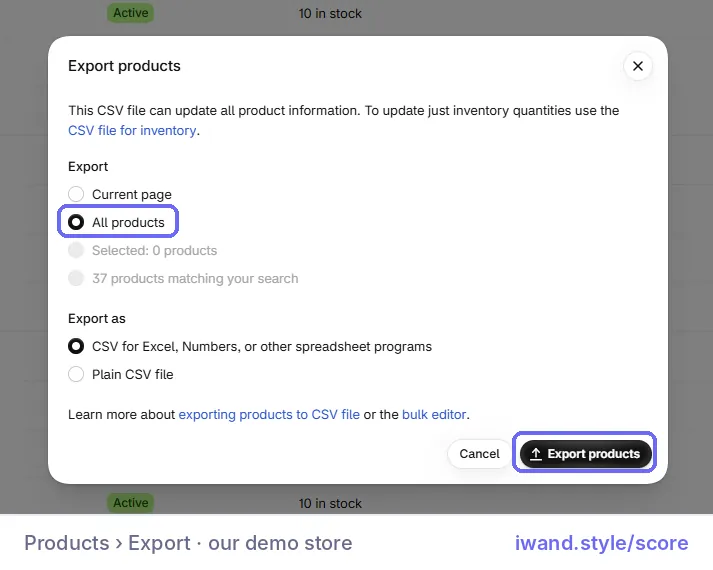
Go to Products › Export, choose All products and click Export products. The Skill asks you to confirm the backup before it starts.
- Apply to all. Tell the Skill to apply to all. It works through the catalogue in batches of 20 and shows each batch’s table first.
- Review each batch. Read every row, reply apply, then reply next. After each batch it reports three counts: renamed, skipped because already good, and needs a detail from you.
- Check on your phone. Open your biggest collection and run the two-minute check again.
On our demo store, all 37 products were renamed in 4 runs: test on 5, apply those 5, then batches of 20 and 12. Every name had been the style name and colour only. The two-minute check went from 0 of 10 to 10 of 10:
| Before | After |
|---|---|
| Sora – Green | Sora Leather Slide Sandals – Green |
| Tova – Black | Tova Croc-Embossed Leather Flat Sandals – Black |
| Nina – Multi | Nina Midi Cotton Dress – Multi |
| Nina – Blue | Nina Midi Cotton-Blend Dress – Blue |
| Momo – Brown | Momo Smooth Leather Large Tote Bag – Brown |
| Vale – Black | Vale Vinyl Pants – Black |
| Mira – Sand | Mira Nappa Leather Mule Sandals – Sand |
| Meli – Multi | Meli Linen-Blend Pants – Multi |
| Mesa – Multi | Mesa Chiffon Kaftan – Multi |
| Kiko – White | Kiko Denim Shoulder Bag – White |
Keep new products named
Shopify Flow is a free app on the Basic, Grow, Advanced and Plus plans (Shopify Help Center, 2026). One workflow tags every new product so none is missed.
- Tag new products. Open
Apps › Flowand create a workflow. Choose the trigger Product created and the action Add product tags, enterneeds-product-name, then turn the workflow on. - Or ask Sidekick to build it. Paste the prompt below into Sidekick, review the workflow it builds, then turn it on.
- Run the Skill weekly. Once a week, type
/product-namesand ask it to rename products tagged needs-product-name. It tests first, renames what you approve, then removes the tag.
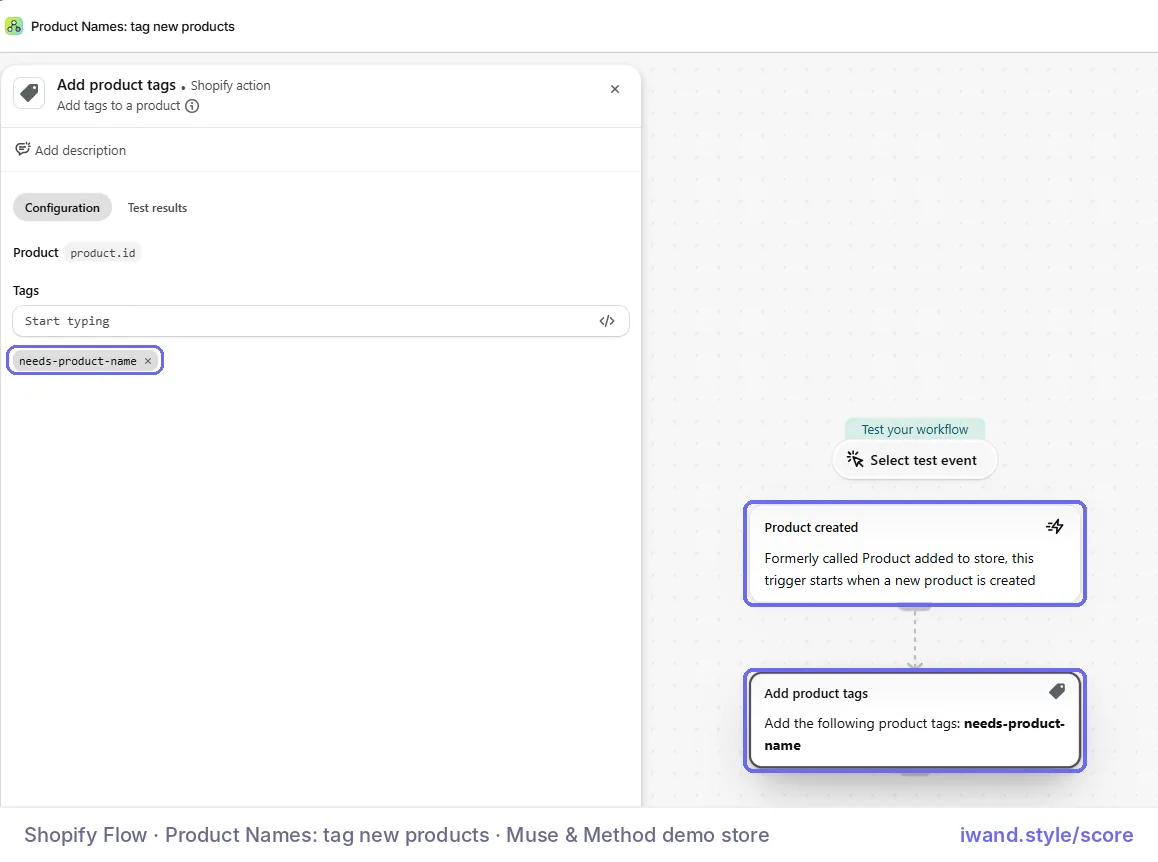
Build a Flow workflow that adds the tag needs-product-name to every product when it is created.Review the workflow Sidekick builds, then turn it on and test it with one new product.
The weekly run stays a manual step for now: whether Flow’s scheduled trigger can start a Sidekick skill is untested.
What can’t the Skill do?
The Skill changes only product titles, and it never invents a detail, so a few things stay with you.
- SEO titles. The Skill doesn’t change them. If you set custom SEO titles, check them by hand. A product export shows an SEO Title only where it was customised (Shopify Help Center, 2026).
- Missing details. A product with no fabric, length, fit or other detail written anywhere gets the item word only, and the Skill lists it under needs a detail from you. Add one fact to its description, then run the Skill again.
- Colours sold as separate products. The Skill names each one with its colour last. Showing them to AI channels as one listing is a separate setting, custom variant grouping in Shopify Catalog mapping (Shopify Help Center, 2026).
Selling on Google Shopping?
Google asks that titles created with generative AI be sent in its structured title field, marked as AI-made (Google Merchant Center Help, 2026). Before you rename in bulk, check how your Google & YouTube app sends product titles to Merchant Center.
Prefer to do it by hand?
Open a product in your Shopify admin and change its title, following the rules above. For several at once, select them in Products and click Bulk edit; check under Columns that the title is shown. Shopify explains it in Bulk editing products.
How long does it take and what does it cost?
A typical store takes about 1 hour to rename with the Skill, and it is free with Sidekick.
| What | Time | Cost | Skills needed |
|---|---|---|---|
| Our demo store | About 30 minutes for 37 products, from test to last batch | Free with Sidekick | Reading a table, replying apply |
| A typical store | About 1 hour, including the backup and reviewing each batch | Free with Sidekick; your own plan if you use Claude | Reading a table, replying apply |
| Keeping it done | A few minutes a week for new products | Shopify Flow is free | Turning on one workflow |
How do I know it’s fixed?
The fix is working when the Styling Score shows Product Names as Done and AI-referred visits rise over the next 30 days.
- Re-run the Styling Score. Product Names should show Done, with 5 or more of the 10 sampled names passing both questions.
- Watch your AI channels. In
Sales channels › Agentic, see how your products perform across AI channels and which searches they show for (Shopify, 2026). Orders from AI channels show in your admin with channel or referrer attribution. - Compare 30 days. Shopify Catalog updates your product data continuously, so new names reach AI channels without a manual resync (Shopify Help Center, 2026). Each channel ranks in its own way, so compare AI-referred sessions for the 30 days after the change with the 30 days before.
Where do product names fit in AI Traffic?
AI Traffic has five factors, and product names carry the most weight with occasion descriptions.
- 01Occasion DescriptionsProduct descriptions name the occasion.
- 02Product NamesProduct names say what the item is.You are here
- 03Need-based CollectionsCollection pages explain the need they serve.
- 04Styling GuidesStyling guides on the site that AI can cite.
- 05Brand StyleThe brand’s style in plain words.
Once AI sends the shopper, the next job is keeping her exploring: start with How to Increase Engagement on a Shopify Fashion Store.
What else do founders ask about product names?
Founders most often ask these eight questions.
Should I put keywords in my Shopify product titles?
Yes, but only the words a shopper would type: the item word and one or two details. Keep your style name in front, then add details such as length or fabric, then the item word, for example Maya Linen Midi Dress. Keyword lists and repeated words make a name harder to read and add nothing AI can use.
Will descriptive names hurt my brand’s style names?
No. The style name stays in front, spelled as you write it, and you only add what the piece is. Christopher Esber does this with names like Oasis Ruched Midi Skirt: the line name keeps the brand, and the rest tells AI what it is.
How long should a product name be?
Most good fashion names are under 50 characters. Keep the item word within the first 70, because Google says shoppers usually notice only the first 70 characters or fewer (Google Merchant Center Help).
Why do my competitors show up in ChatGPT and my store doesn’t?
AI assistants match a shopper’s words to your product data, and the name is the first thing they read. A dress named only Maya matches none of the words in green linen midi wrap dress. Adding the item word and one detail gives AI something to match.
Should the colour go in the product name?
Only when each colour is its own product. Then put it last, in your own colour word, such as Tova Croc-Embossed Leather Flat Sandals – Black. When colours are options on one product, leave the colour out of the name.
Do I need to change my URLs or SEO titles too?
No. Changing a product’s title doesn’t change its URL handle, so links stay. If you once set custom SEO titles, check them by hand, because a new product name doesn’t change them.
How do I keep new products named the right way?
Set up a Shopify Flow workflow that tags every new product with needs-product-name, then rename the tagged products once a week and remove the tag. Flow is free on the Basic, Grow, Advanced and Plus plans (Shopify Help Center).
What if a product has no details written anywhere?
Give it the item word only, then add one fact to its description, such as the fabric or the length. Never guess a detail from the photo.
Sources
- Google Merchant Center Help. Title and structured title. Checked Nov 5, 2026. https://support.google.com/merchants/answer/6324415
- Google Merchant Center Help. Best practices for advertising clothing and accessories. Checked Nov 5, 2026. https://support.google.com/merchants/answer/7348545
- Shopify Help Center. Shopify Catalog. Checked Nov 5, 2026. https://help.shopify.com/en/manual/shopify-catalog
- Shopify Help Center. Optimizing your products for AI platforms. Checked Nov 5, 2026. https://help.shopify.com/en/manual/shopify-catalog/optimizing-products
- Shopify Help Center. Shopify agentic storefronts. Checked Nov 5, 2026. https://help.shopify.com/en/manual/online-sales-channels/agentic-storefronts
- Shopify Help Center. Shopify Catalog and product discovery for agentic storefronts. Checked Nov 5, 2026. https://help.shopify.com/en/manual/online-sales-channels/agentic-storefronts/products
- Shopify developer changelog. A new home for Agentic Storefronts in your admin. May 11, 2026. https://shopify.dev/changelog/a-new-home-for-agentic-storefronts-in-your-admin
- Shopify Standard Product Taxonomy. Release 2026-11-unstable. Checked Nov 5, 2026. https://github.com/Shopify/product-taxonomy
- Shopify Help Center. Sidekick. Checked Nov 5, 2026. https://help.shopify.com/en/manual/shopify-admin/productivity-tools/sidekick
- Shopify Help Center. Sidekick skills. Checked Nov 5, 2026. https://help.shopify.com/en/manual/ai-powered-tools/sidekick/skills
- Shopify Help Center. Shopify connector for Claude. Checked Nov 5, 2026. https://help.shopify.com/en/manual/ai-powered-tools/connecting-ai-tools/shopify-connector-for-claude
- Shopify Help Center. Shopify Flow. Checked Nov 5, 2026. https://help.shopify.com/en/manual/shopify-flow
- Shopify Help Center. Flow triggers reference. Checked Nov 5, 2026. https://help.shopify.com/en/manual/shopify-flow/reference/triggers
- Shopify Help Center. Flow actions reference. Checked Nov 5, 2026. https://help.shopify.com/en/manual/shopify-flow/reference/actions
- Shopify Help Center. Exporting products. Checked Nov 5, 2026. https://help.shopify.com/en/manual/products/import-export/export-products
- Shopify Help Center. Bulk editing. Checked Nov 5, 2026. https://help.shopify.com/en/manual/shopify-admin/productivity-tools/bulk-editing
- Adobe Digital Insights. AI traffic grows but retail sites lag in AI search visibility. April 16, 2026. https://business.adobe.com/blog/ai-traffic-surge-retail-sites-not-machine-readable
- iWAND. Styling Score reviews of 142 Shopify fashion stores against the Product Names rule, scored Oct 12 to Nov 6, 2026 and read Nov 7, 2026.
- Featured brands’ collection pages, read Nov 5, 2026 and captured Nov 6, 2026: Wrabyn · Silk Laundry · Christopher Esber.
See iWAND style your own catalogue: free private preview
Ask iWAND the questions your shoppers ask, on your own products, in a free private preview before any shopper sees it.
AI Traffic
Check every AI Traffic factor on your store
The free Styling Score walks all five AI Traffic factors and shows where your store stands.
Master pillar
From a salesperson into a stylist
Part of Grow Your Shopify Fashion Store with Styling: Salesperson to Stylist, our guide to turning a Shopify fashion store from a salesperson into a stylist.